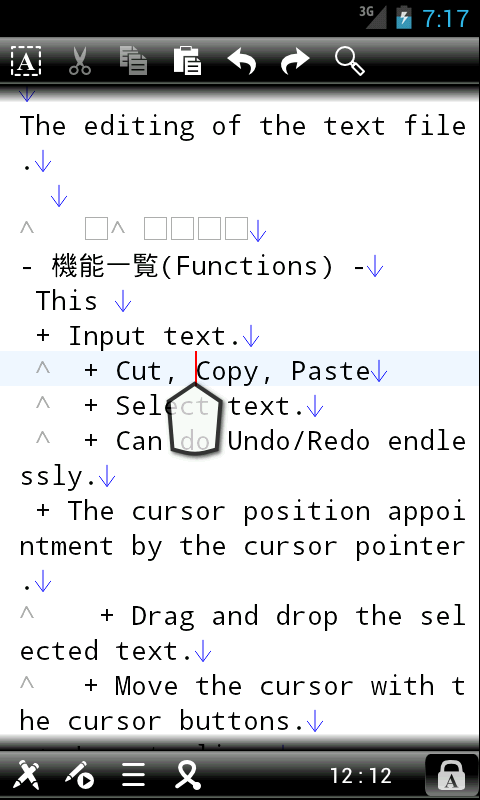
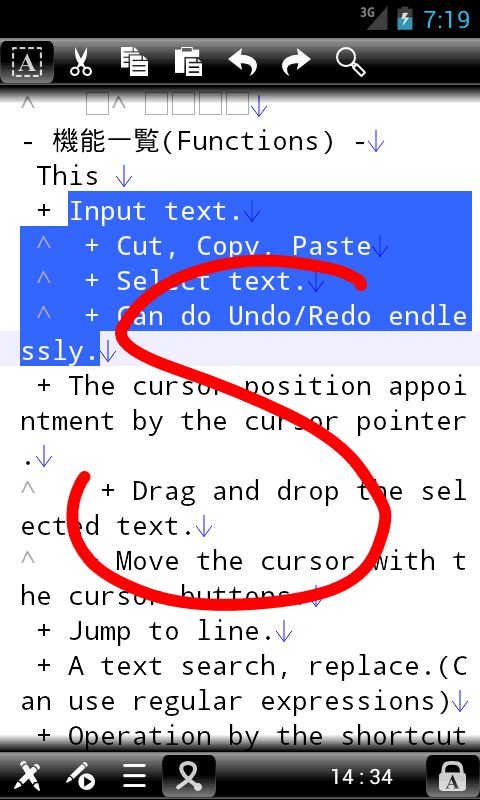
This application is a multi-function text editor for Android.
In addition to regular text input editing, Undo / Redo can endlessly, a shortcut key operation, and automation of key macro editing, call the various functions through gestures, advanced text editing is available.
This application can use the following functions.
As for the file except the SD card, edits are prohibited, and a system
may not work when you edit it forcibly.
Because we do not guarantee it at all, please use it on a self-responsibility.
|
4.5.2
|
- Fixed an issue with the display icon in the file list screen.
|
|
4.5.1
|
- Fixed a problem that can not be terminated by Back button if you cancel during the save confirmation.
|
|
4.5
|
- Added a theme setting for Android 4.x.
- Fixed the problem that appears when you cancel the file read.
- Fixed the internal processing.
|
|
4.4
|
- Changed the icon.
- Fixed an issue that was specified character encoding does not work.
- Fixed the problem can not open the heavy file when it is called from the outside.
- Fixed the behavior when you press and hold the center key.
- Changed the behavior when selecting Search / Replace menu.
- Changed the behavior when selecting the Macro menu.
- Changed the height of the bar variety.
- Added a menu button on the screen, such as a menu.
- Fixed the internal processing.
|
|
4.3
|
- Added option to not display the cursor pointer selected during the long press.
- Added option to not use the shortcut keys.
- Added option to not use the gesture.
- Changed the design of the icon in the menu button.
- Fixed an issue where an error occurs when some input in the IME.
- Fixed an issue in which the text is deleted when you rotate the screen when text selection.
|
|
4.2.2
|
- Fixed a display problem such as a button may be illegal depending on the size of the screen.
|
|
4.2.1
|
- Fixed an issue where an error "Insert text" function.
- Fixed an internal processing.
|
|
4.2
|
- Has revived the "Select-mode" function. (This function is to facilitate
text selection)
- Added the "Select-mode" to "Edit" menu.
- Has revived the "Select-mode" button.
- Has been deleted the "Save" button.
- Was slightly larger size of the cursor button.
- Fixed an internal processing.
|
|
4.1.1
|
- By the screen size problem has been corrected error occurs when
you start.
|
|
4.1
|
- Added the ability to "Selected range info" to the "Edit" menu.
- Displays the number of characters in the selected range,
the number of lines, starting position, the end position.
- Changed the default color for the line break.
- Changed the display of the document list.
|
|
4.0.1
|
- Fixed an issue can not be called the "Close" in the function call and gesture.
- Fixed a problem where the state of the "Search / Replace" button will not change when you select a "Search / Replace" menu item.
- Fixed an issue with the location of the item is not initialized when you cancel the menu list.
|
|
4.0
|
- Added the ability to edit multiple documents.
- You can can have multiple documents open, switch.
- Was added to the Document menu.
- Memo function has been abolished.
- Added the ability to call a favorite feature when the tap, press
and hold, flick the cursor position display area.
- Features like touch shortcut keys, you can call a fast favorite
feature is available.
- The setting screen is displayed when you tap when not set.
- Abolished the ability to call the line to jump when you
double-tap.
- Has enhanced the shortcut key. (Requires a hardware key)
- Increased the key type available.
- Function keys, Tab, Enter, Space, Home, End, PageUp,
PageDown, etc. are available in addition to alphanumeric
characters.
- In addition Ctrl, Alt, Sym, the Function key can also
be used in combination with the Shift key.
- Some terminals can not be used if there is a specific
key combination.
- Was dramatically increased the available capabilities.
- You can call the various functions as well as the ability
gesture.
- Was abolished the ability to use the shortcut key Alt key.
- You can change various settings to use the Alt key shortcut
for each key.
- It clears the previous settings at the time of first use,
please re-set.
- Added a feature available with the gesture.
- To the "Edit" menu item was added to "Register text".
- You can register the selected text function "Insert text".
- Added the ability to repeat the Undo / Redo button.
- Changed the behavior when you press and hold the text editing
area.
- For moving the cursor pointer is displayed when you tap
to normal.
- Selection cursor pointer appears when you press and hold
to normal.
- Switches to the cursor pointer for drag and drop and you
press and hold is applied when you select the text to display
when the cursor pointer selection.
- Switches to re-select pointer cursor when you press and
hold the cursor display pointer for drag and drop.
- Pointer when the cursor is off when the text selection has
been selected will display the cursor pointer.
- Selection by double-tap, the row selection functions are
also available by the triple-tap.
- Selection mode has been abolished. Has been deleted mode
selection button, a menu.
- Added the Save button.
- Changed the handling of canceled operations on the menu.
- Has been modified to take a check when you call the macro, such
as setting to save processing time.
- Was to remove the "clear cache" button in the Basic Settings
screen.
- Add the "Select" from the Edit menu.
- You can select a word, line selection.
- Added the ability to display a menu list in the macro menu and
search.
- Fixed drawing of the selection.
- Fixed an issue where when Toast does not appear when using the
gesture.
- Changed the backup function.
- The internally maintained edits at the time of the abend.
- Then, check whether you want to restore the next time you
start.
- Please note that your edits will disappear at the end of
the anomaly have internally when you uninstall the app.
- Was faster fixes and internal processing.
|
|
3.2.4
|
- Fixed the problem that when scrolling the cursor pointer is shifted.
- Fixed the display of only selected line breaks.
|
|
3.2.3
|
- Fixed a resource in Spanish.
- Fixed a resource of Chinese (Traditional).
|
|
3.2.2
|
- Fixed an issue where the display position of the cursor shifts related to the line wrapping.
|
|
3.2.1
|
- Fixed an issue with some buttons will remain disabled when you use the search function when you select text.
- Fixed an internal processing.
|
|
3.2
|
- Improved method of text selection.
- Two pointers will be displayed when the selection mode,
or when double-tap.
- Pointer when the double tap will disappear in a given time.
- Changed the behavior of the scroll when the cursor pointer.
- Has been changed as can be released again by holding down the
drag-and-drop mode.
- Added the ability to call the function when you double-tap jump
line to line number display part.
- Has been changed as a terminal to display the menu button in
the resolution of non-Tablet.
- Changed the placement of the button part.
- Changed the design of some icon buttons.
- Added the image for high-resolution screen.
- Fixed the processing of the search function of gesture.
- Fixed an internal processing.
- Language has been added.
- Has been changed help to online help.
|
|
3.1.4
|
- Fixed an internal processing.
|
|
3.1.3
|
- Fixed an internal processing.
- Added high resolution icons.
|
|
3.1.2
|
- Fixed a problem up and down buttons are not displayed in the order setting screen of the bookmark.
|
|
3.1.1
|
- Fixed an issue when changing the cursor position is shifted to the size of the viewing area.
- Added the ability to cancel a drag-and-drop mode, select-mode, such as when the character input.
|
|
3.1
|
- Added ability to move the cursor position with the touch operation during the conversion character.
- Fixed a rendering engine.
- Fixed an issue where the IME menu disappears as soon as it is not, or even out.
- By IME has fixed the problem that when does not work BackSpace(Delete).
- Added support for delete function by extension of IME.
- Fixed the movement of the cursor pointer.
- Fixed an issue where the cursor display start position of the drag & drop pointer shifts.
- Fixed a selection display.
- Fixed character position deviation of the display.
- Fixed an issue with save confirmation is not displayed in the operation when you gesture "Open" list.
- When we changed the behavior of the cursor up and down.
|
|
3.0.1
|
- Gesture features "Send Selected text" fixed.
- Garbled characters in the help page fixed.
|
|
3.0
|
- Added functionality gestures.
- Added a gesture button.
- Removed the screen lock button.
- Added by dragging the cursor movement functions.
- Added the ability to be able to search using regular expressions.
- Added the ability to call the Search History.
- Treatment was changed when replacing the cursor movement.
(Do a replace and search.)
- Added the ability to convert Japanese characters.
(Half width / Full width Japanese KANA)
- Added Japanese string conversion function and regular expression
search to key macro.
(Changed to 1.1 version of the macro file. Reading a file of 1.0,
can be used.)
- Fixed a bug in the key macro recording feature.
- The File menu "View in Browser" has been added.
(It is possible to display the built-in browser for local files!
When editing useful with HTML!)
- Added the ability of JavaScript to the browser's built-in log
view.
- Added ability to specify fonts that are pre-installed.
- Fix to eliminate the Toast during edits.
- Changed the order history list was last opened.
- Fixed the behavior when you open the shortcut menu.
- Fixed interrupt handling when saving data.
- Fixed internal processing.
|
|
2.7.5
|
- The "Choose folder" screen display has been fixed.
|
|
2.7.4
|
- Fixed an issue where incorrect selection display.
|
|
2.7.3
|
- Fixed so the effect of the IME locked out after using the IME in the other dialog.
- Fixed an issue which will not start when the toolbar is displayed below. (Only free edition)
|
|
2.7.2
|
- Fixed an issue where the cursor shift to enter characters in the wrapped position.
- Fixed an issue that can not see the cursor pointer.
- Fixed a problem with selective display.
|
|
2.7.1
|
- Fixed an issue where the cursor line is shifted.
- Fixed internal processing.
- Adjusted the layout.
|
|
2.7
|
- Added the "Send text" feature to the Edit menu.
- Reviewed the status of the save feature by moving the screen.
- Fixed a problem shifts the cursor position is moved at high
speed.
|
|
2.6.1
|
- Added ability to hide / show the IME when you press the IME lock button.
- Optimized layout.
|
|
2.6
|
- Added IME lock button.
- Optimized layout.
- Fixed internal processing.
|
|
2.5
|
- Added functionality to display the IME when you tap the editing area.
- The IME button has been removed.
- Fixed internal processing.
- The UI was optimized for large screen sizes such as a tablet.
|
|
2.4.2
|
- Fixed an issue when the new line position shifts.
- Fixed an issue that could drag and drop mode is enabled when
the select-mode switching.
- Fixed an issue where the line is not displayed when you move
the text cursor to drag and drop.
- Fixed to not display the cursor pointer outside the display
region when the cursor line. (With drag and drop mode and selected
mode)
- The UI was optimized for large screen sizes such as a tablet.
|
|
2.4.1
|
- Fixed an issue where an error occurs when the full screen the IME.
- Fixed an issue that is listed twice to select the "Re-Open" menu and save the confirmation dialog.
|
|
2.4
|
- Added ability to set the left and right margins.
- Added ability to set the top and bottom margins (spacing lines can not move cursor).
- The UI was optimized for large screen sizes such as a tablet.
- Added the ability to lock screen rotation.
- Added the ability to Home / End button locks the cursor.
- Added the ability to insert a tab character.
- Reviewed the menu item.
- Added the Edit button.
- Added a menu button. (Mainly for Kindle Fire)
- Added Select All menu.
- Added the Delete menu (same behavior as the Delete key on PC).
- Optimized internal processing.
- Fixed an issue where the cursor position shifts during the transformation to touch the editing area IME.
- Fixed an issue that can not move the cursor to move the pointer away.
- Fixed an issue where an error occurs when you remove at once Backspace.
|
|
2.3
|
- Speeded up the processing.(Drawing / Scrolling. etc.)
- Added the ability to drag and drop.(After selecting the range, and can be used to press and hold)
- Improved touch sensitivity by moving the cursor.
- Redesigned the cursor pointer.
- Changed to use a fade-out animation disappear when the cursor pointer.
- Fixed to not move the cursor along the line when scrolling through touch.
- Added functionality to allow changing the selection on the touch when you hold down the Shift key.
- Fixed to undo the selection by Undo / Redo.
- Changed the default brightness to 50%.
- Fixed a problem that falls during the conversion IME.
- Fixed a problem that is displayed when you enter wrong IME.
- Fixed an issue where the cursor after entering a position different from IME.
- Fixed a problem that is hidden by a character at the cursor line after committing IME.
- Fixed an issue where the buttons used to move the cursor when entering IME.
|
|
2.2
|
- Added the button ability to move the cursor into the text editor.
- Added a grid view to display the file list screen.
- Incremental search feature has been added to the file list screen.
- Changed the position of the search button.
- Fixed scroll bar to display lights up when you move the folder.(for
2.x and more)
- Fixed to the internal processing.
- Remove unnecessary permissions (only free edition)
|
|
2.1
|
- Added option to use the text file extension(".txt") when saving a new text.
|
|
2.0.2
|
- Fixed a problem that has been converted characters are removed during processing IME reconversion.
|
|
2.0.1
|
- Fixed a problem when it comes to triple-tap error.
|
|
2.0
|
- Key Macro (keyboard macro) to add functionality.
- Register to add a text insertion function.
- Date and time insert additional features.
- Additional features uppercase / lowercase.
- Add the half / full width conversion function.
- Replace all additional features.
- Add memo feature.
- Add a bookmark feature.
- Add a thumbnail of the image display function.
- Added ability to remove spaces to indent.
- Clearly fix opacity settings screen color display.
- Fixed an issue that can not see the character position indicator
|
|
1.2.1
|
- Fixed a double tap in place choice behavior without the character.
- Added the ability to select text by pressing the center key
twice and three times.
- Fixed a problem that does not Shift key lock state is released
when starting IME.
|
|
1.2
|
- Fixed function keys with the Ctrl key shortcuts.
- Added the ability to "Re-Open"
- Double-tap, triple tap selection with added features.
|
|
1.1.1
|
- Added memory liberation processing for image.
|
|
1.1
|
- It is revised the problem that IME disappears by after dialog
indication.
- A new line mark revised the problem that was not given after
a screen turn.
- Add a function to display the number of the files, the number
of the folders to the property of the folder.
|
|
1.0.3
|
- Revised the error message in the character code of non-support.
|
|
1.0.2
|
- Revised a problem to become the unjust cursor position at the
time of conversion cancellation of IME.
- A cursor position revised a problem to overlap with IME at the
time of a conversion start of IME.
- Delete permission of the net access.
- Changed it to communicate the license confirmation at every
update.
|
|
1.0.1
|
- A text color revised the problem that did not change at the
time of reconversion.
|
|
1.0
|
|

 SkyArts Editor
 Wrix - Ultra-High-Functional Text Editor
 There is also a Completely FREE "Wrix Free"!
 You
can also download the free version of the "
You
can also download the free version of the " You
can download it from Amazon Appstore!
You
can download it from Amazon Appstore!